
How to Search Civil Dockets
Know your court before you touch a Morrow County civil docket search. Common Pleas General Division is the county trial docket. Major civil actions, foreclosures, workers' compensation matters, and appeals within its jurisdiction all land there. The Clerk's CourtView eServices Case Inquiry covers that court. One caution applies. CourtView's public entry uses a CAPTCHA and browser-session process, so work from its live screen rather than expecting a fixed field list.
Municipal Court is a separate story. Its civil and small-claims system covers records from 2007 forward, per its own official description. If a case does not show up there, it may belong to Common Pleas, another division, a restricted record category, or a different office entirely. Check the court named on any notice, order, or prior filing. That tells you which record system comes first.
- Identify Common Pleas General Division, Domestic Relations, or Municipal civil and small claims from the case paperwork.
- Use CourtView Case Inquiry for a Common Pleas case, or open Municipal Court’s civil and small-claims status search for a Municipal case.
- Search the Municipal system by plaintiff, defendant, case number, or attorney name. Use the narrowest known information.
- Confirm the court, category, case number, and current setting before relying on a result or a date shown in a calendar listing.
- Ask the clerk that maintains the case for a filed paper, judgment, or certified copy when the docket index is not enough.
Morrow Civil Status Search
Municipal Court offers a civil and small-claims status form. That form stands apart from the criminal and traffic history search. Four tabs drive it: Defendant, Plaintiff, Case Number, and Attorney Name. Partial names work fine. Entries cap at 100 characters, and 2013SC1234 shows the shape of a small-claims number. Expect no court selector, export, date range, or refresh schedule. What you see on the official form is what it does.
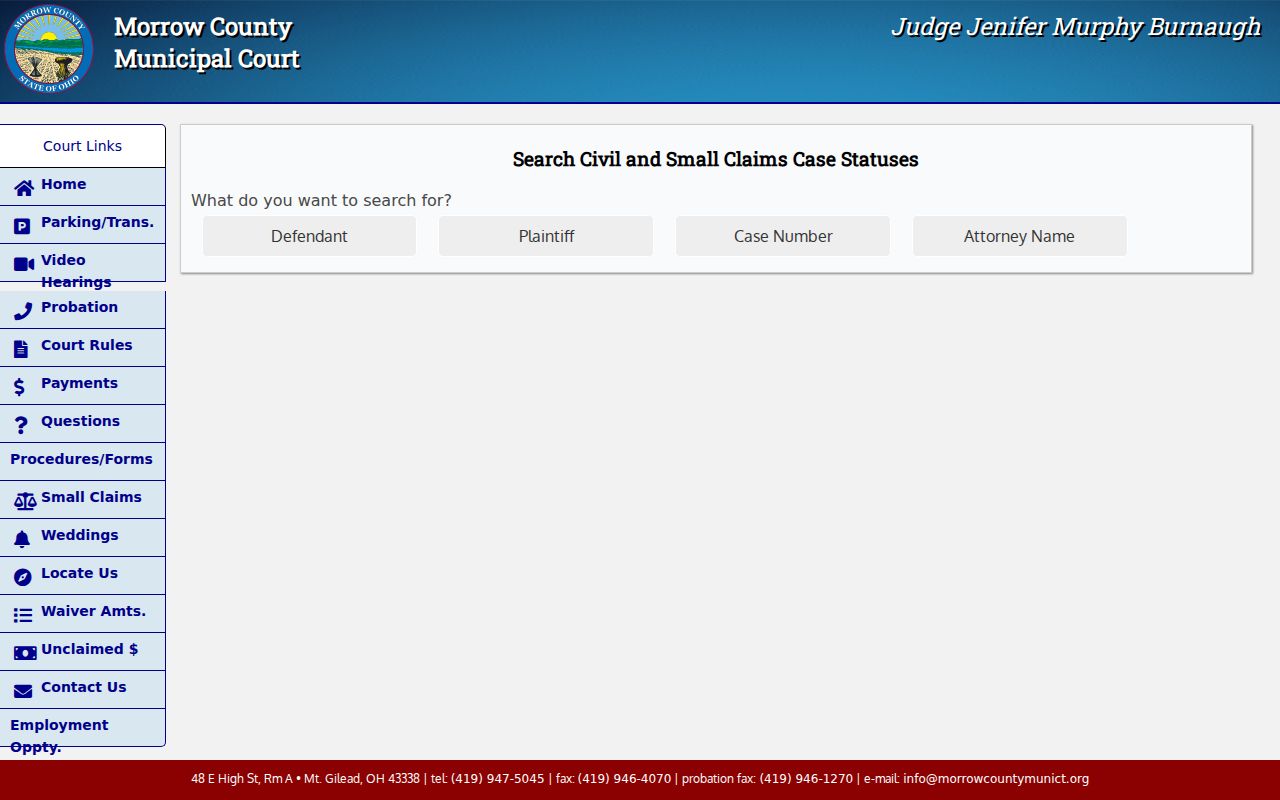
That split matters more than it looks. A civil status result is a Municipal Court route, and it cannot replace the Common Pleas Case Inquiry. Nor is it the upcoming-hearing form, which helps with a future setting but never explains why the matter is set in the first place. Only the event history does that.
What a Civil Docket Shows
Think of a Morrow County civil docket as a chronological index. It logs what the court has received, scheduled, or decided, in order. Common Pleas materials point to Case Inquiry and Court Schedule. Municipal Court splits Case Status from Upcoming Hearings. The practical takeaway is simple. Some fields may not appear on every screen. So confirm what you need in a live public record or through the clerk.
| Case Number | The court-assigned identifier. Municipal daily calendars have shown CV-family forms, while 2013SC1234 is a portal example for small claims. |
|---|---|
| Parties | Plaintiff and defendant roles, and attorney information where the public display provides it. Match roles with the correct case number. |
| Filings | The initiating complaint or petition, service activity, response, motions, notices, and orders recorded by date. |
| Settings | Status conferences, pretrials, hearings, or trial dates. A calendar row is only a date snapshot and may be replaced later. |
| Judgment | A final judgment, dismissal, or other disposition when entered, plus later post-judgment activity where the docket remains active. |
Remember, the docket is only an index. A complaint, judgment entry, or other underlying document can carry its own public-access status, and you may need to request it from the clerk directly.
Morrow Civil Docket Boundaries
Morrow County Court of Common Pleas has four divisions: General, Domestic Relations, Juvenile, and Probate. Their public portal access is not uniform. Domestic Relations sits inside Common Pleas. Yet Ohio's online-document provision does not require every domestic-relations general docket or document to be published. Probate and Juvenile each run a separate clerk channel. These boundaries matter. Ask the correct office about access. That beats casting a broad name search across unrelated court records. The Probate Division's official page confirms its own division and clerk-access path.
Probate material is not a General Division civil docket in ordinary form. Keeping the divisions straight prevents a common mistake: reading a missing public search result as proof that no court file exists. It usually means no such thing.
Types of Civil Cases on the Docket
Case types depend on the venue. Common Pleas General Division takes the major civil litigation. The local fee schedule names new civil complaints, workers' compensation matters, foreclosures, and post-judgment filings as distinct categories. Municipal Court's public civil interface serves municipal civil and small-claims records only, by its own terms. Domestic Relations belongs to a Common Pleas division but demands its own access check. Venue first, category second.
- Common Pleas General Division civil actions, including larger civil disputes and workers’ compensation matters.
- Foreclosure actions and related post-judgment docket activity in Common Pleas.
- Municipal civil cases, found through the Municipal Court’s separate civil status and calendar forms.
- Small-claims cases, which use the Municipal Court civil and small-claims system.
- Domestic Relations matters, which are held in their own Common Pleas division and may have different online access limits.
Never infer a dollar limit from a local search form. Ohio's civil and small-claims jurisdiction statutes, the court level, and the filed case together control the right docket route.
Morrow Domestic Docket Access
Domestic Relations is a real Morrow County Court of Common Pleas division. Treat it as its own thing. It is not a public branch of the General Division civil docket. R.C. 2303.12's mandatory online-document provision carves out an exception for domestic-relations general dockets and documents. So a missing public record is not the end of the road. Confirm the division and the request path with the proper court or clerk. The Domestic Relations Division page is the official word on that distinct Common Pleas division.
A gap online never proves a filing never happened. It can reflect a division-specific limit, a restriction, a different filing date, or a portal access issue.
Settings and Hearings on Civil Dockets
Civil hearing dates have more than one source here. The Common Pleas side posts its CourtView Calendar page. That link is the court's named Court Schedule route. Under Local Rule 7, the Assignment Commissioner schedules filed matters through CourtView Justice Solutions. A delayed case can draw a status conference. One caution applies. CourtView's public entry has browser-session requirements, so open the calendar live instead of trusting a saved page.
Municipal civil and small-claims future settings use a separate Upcoming Hearings form. Defendant, plaintiff, case number, upcoming-hearing date, or attorney name each work as a search. Compare that row with the newest docket events. A continuance moves a hearing, and an old calendar row can stay visible after a later order changes the date.
Morrow Civil Time Guidelines
Common Pleas General Rule 7 sets case-management targets, not personal deadlines. It tolerates 120 days for foreclosure and contested divorce matters. Other tort and personal injury actions get 210 days. Medical malpractice is 360 days. Complex litigation runs to 720 days. None of these benchmarks promises a hearing date. Nor do they promise a dismissal or a judgment on that timetable. The docket and the current scheduling order control the individual case.
A date can look stale or unclear. Rely on the docket's most recent entry. Then confirm the setting with the correct court office. That matters most after a continuance request or any later court order.
Morrow Civil Records and Judgments
A civil docket entry proves an event happened. It does not hand you the filed judgment, complaint, order, or certified copy behind that event. The Morrow Common Pleas Legal Division keeps the legal docket and case files for both the General and Domestic Relations divisions. CourtView works well as an index. The Clerk's Internet Services Disclaimer, though, states that online indices are not official records. Where information conflicts, the Clerk office index controls.
| Item | Best Morrow Route | What It Establishes |
|---|---|---|
| Online docket index | CourtView or Municipal public search | Publicly displayed case events, settings, and locator information. |
| Filed judgment or order | Maintaining court clerk or division office | The actual filed document, if public and available. |
| Certified copy | Maintaining clerk after method and fee confirmation | A clerk-certified record, not a screenshot or portal printout. |
The posted Common Pleas schedule lists $0.35 per plain printed page. A certified copy runs $3.00. Whether a certified request also carries page charges is not stated, so confirm the current total with the Legal Division.
Public Access to Civil Dockets
Who may see a Morrow County civil docket? It depends on the court level, the record category, and Ohio court-access rules. For qualifying Common Pleas General Division civil matters, R.C. 2303.12 imposes electronic-access duties. The statute preserves exceptions. Restricted material stays closed. Personal identifiers stay closed too. So do certain domestic-relations records and other court-controlled records; a related docket alone does not make them public. The Municipal Court adds its own public search disclaimer. It does not promise that an online display is complete or official.
Key Rules:
Ohio Revised Code § 2303.12 addresses the Common Pleas clerk’s records and electronic access to qualifying General Division civil and criminal docket materials.
Ohio Rules of Superintendence, Rule 11 supplies the current public-access, personal-identifier, and restriction framework for court records.
Ohio Revised Code § 149.43 is the public-records statute for county administrative records, but it does not replace court rules and clerk procedures for case files.
First verify the court and the division. If a public result is missing, ask the maintaining clerk whether a public docket, a paper file, a redacted version, or a certified record is available. Never ask court staff to disclose restricted information.